Why Mosine
Background
Mosine is an application that has existed inside my head a lot longer than it has on my laptop.
When I was a kid, I often found it difficult to retain timely pieces of information - I forgot about my homework often. Being a geeky child, I found myself drawn to all sorts of special notebooks (I carried around a Filofax for a while) and then to apps all based around helping you solve this forgetfulness problem. As a kid, this was mostly reminders to do your homework. As I got older, my needs for such tools grew and I became a passionate “note taker” through university, armed with my trusty new MacBook and a desire for record-keeping perfection. I tried every system and app there is - none quite sticking for one reason or another - before eventually, towards the end of my time at university, I found Roam Research, and then Obsidian.
Roam had me with their tagline - “Networked thought”. The idea that I could splurge my stream of consciousness onto a page and have it turn into a kind of personal Wikipedia was very enticing. I’m not the kind of guy for beautiful structured documents. I have things in my head and I want them out of my head now before they’re lost forever. 15 whole bucks a month however is a lot to ask of a man who at the time mostly ate chicken breast and rice from Lidl, so Obsidian, being free, won for me.
A few years of Obsidian usage over my actual software engineering career and we’re at the present. As you could have reasoned from the fact that you’re reading this at all, Obsidian was not quite what I was after.
Issue 1 - Tasks
Coming back to the original homework problem, the reason I got into this rabbit hole in the first place was because I needed to remember things that were timely.
Obsidian has plugins for task management, but none of them really worked well for me. My old friend Todoist has some killer features I couldn’t replace, chief among them natural language parsing, which removed all the fiddly UI a lot of task apps are plagued with. I found however having two separate systems, one for notes and one for tasks, annoying. Even worse - once I entered the world of work and Intellectual Property, throwing confidential information into unvetted SaaSes wasn’t on the cards anyway. My notes and tasks needed to live on my machine, not someone else’s server. I have yet to find a decent offline task management software (except Mosine!), if you have one, let me know, and I’ll be sure to tell you why Mosine is obviously better.
I asked myself: can I have straightforward, private task management woven into my notes?
Issue 2 - Stream of consciousness
I got into Roam Research on the basis of this stream of consciousness approach to notes - just write it as it comes out of your head and let the system handle it for you. Everything centres around your “daily note” - a fresh page every day. I love that idea. However, I found while using Obsidian at work, my daily note often looked something like this:
Spoke with [[John Smith]] about bug xyz
- ...
- ...
- ...
    - ...
    - ...
<some screenshot>
Need to fix by monday

Spec for zzz:
- ...
- ...
- ...

UI should have ... as well as ...

Do in a week? Need to follow up with boss.

<random bash command>
<random bash command>
.....
This is messy. Little pieces of information were scattered all over the page, sometimes with links, sometimes with tags, sometimes with nothing.
It did make my end-of-week write-ups easy: I could read back through the week’s daily notes while my sparse writing still made sense to me. But finding anything from weeks ago was a struggle. Knowing you wrote something down but not being able to find it, because you don’t know the right keyword, is maddening.
I asked myself: how do I keep the stream of consciousness, while making it actually useful?
Issue 3 - Search
During particularly stressful stretches at my last job, I’d sit back in my Herman Miller chair, breathe deeply, and acknowledge that my heart rate was not rationally related to the level of physical danger I was currently in. Then I’d ask myself: what’s the most important thing I can be doing right now?
My own note taking system was not particularly up to this task. Sifting through my notes through keyword search and poorly maintained backlinks was not very helpful and I found myself reaching for other systems like Jira to get myself on track, which made a lot of my obsessive note taking redundant.
I asked myself: is there a way to query notes usefully?
The solution - Mosine
Eventually I realised nothing would be good enough for me outside of something I created myself.
First things first: Mosine is offline-first. Your notes are yours. Nothing is sent to a server unless you choose to send it, so it’s safe for work notes, sensitive or proprietary information, and anything else you wouldn’t paste into an unvetted SaaS.
Mosine originally began as an app focused entirely on offline task management. But the more I dug, the more I realised that a note and a task are conceptually the same thing: a piece of information with some attributes. A task is just a note with a completed attribute, plus whatever other metadata is useful, like due or start. Notes have attributes too: links and backlinks to other notes, tags, and values like status, priority or assigned. Mosine treats all of these equally.
Cards
The minimum unit of information in Mosine is a Card. Everything is structured around cards. You can reference cards, embed cards, and search for cards as individual little units. This is a kind of bastardised Zettelkasten approach. A card should contain one piece of information, one thought. How small that is is totally up to you, and largely doesn’t matter as long as it’s useful to you.
Here’s that messy daily note again, the way it would land in Mosine:
Spoke with John Smith about bug xyz
- only happens after a token refresh
- started after last Thursday’s deploy
- John thinks it’s the session cache, worth checking the TTL first
Spec for zzz
- ...
UI should have ... as well as ...
Follow up with boss about zzz timeline
Useful bash commands
<random bash command>
The same content as before is transformed into a series of notes and actionable items you can come back to.
Structured note taking without overhead
Cards are only as findable as their content and metadata, but the app is designed to avoid form-filling and clunky UI elements. Mosine does as much of that work as possible:
- Links between cards. Type
{{and start typing to link to any other card, or use!{{ }}to embed it. Every card shows what links to it, so related thoughts are always one click away. - Inline tags and attributes. Add them as you type, or in the metadata row at the bottom of each card. Drop-downs assist with autocomplete.
- Natural language dates. Write
due: next fridayorstart: tomorrowand Mosine works out the date for you. - Saved queries. Mosine is built around views: lists of cards that match a query. Save the ones you use often (tasks, due today, current projects etc.) and group them however you like. A card created inside a view automatically inherits that view’s tags and fixed attributes.
- Templates. Start cards with metadata or text already in place: a task with a checkbox and a todo tag, a 1:1 outline, a gratitude journal.
- Built-in AI. Cmd+K, Ask and MCP integrations let AI agents create, tag and find cards for you. Privacy is built in, and local agents are available to keep private data on your machine.
Queries
Returning to that Herman Miller chair, I ask myself: what’s the most important thing I can do right now?
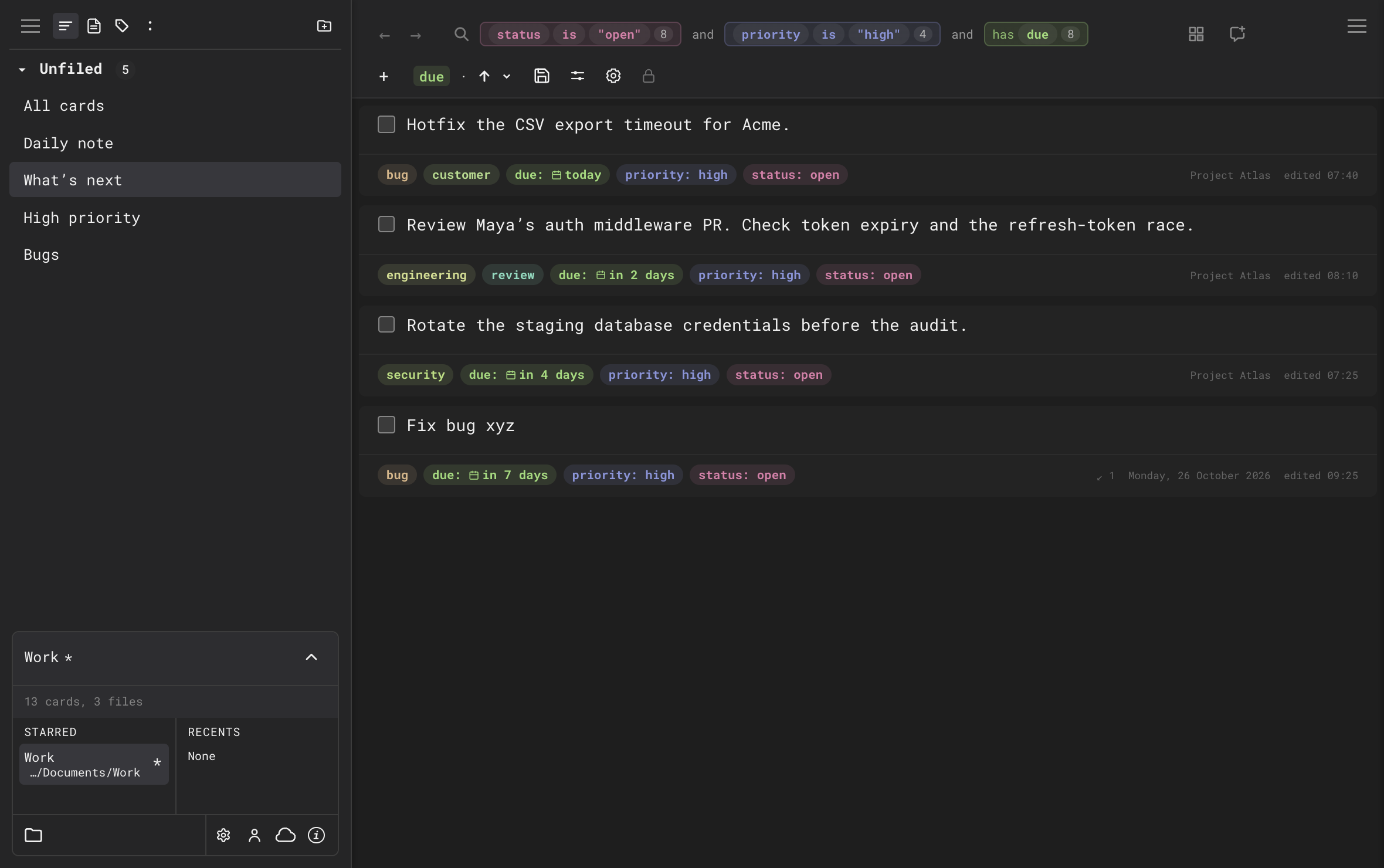
status is "open", priority is "high" and has due, sorted by due.Suddenly my high priority items are right in front of me. I can quickly find tasks with due dates as well with has due and order them by due date.
That bug fix I scribbled down in my daily note is now easy to find:
Fix bug xyz
All of this together is Mosine - note taking at the speed of thought. Write what you want right now into a new card, and it’s saved forever. Always findable, always yours.
-Mark